Developer API
Everything your agent does for visitors on your website, it can do for your own tools: answer a question from whatever automation tool you run, from an AI assistant such as Claude Code or Cursor, or from a script you wrote. This page is the complete reference for the DeskClone API, its notifications (webhooks), and the MCP server. It is written for the person setting the integration up; if that is not you, send them this page.
Every question asked through the API is part of a conversation, and a conversation counts once against your monthly plan, exactly like a chat on your website. Follow-up questions on the same conversation_id stay inside that one conversation, with the same limits a website chat has: an exceptionally long thread, roughly 40 to 50 exchanges, can count as more than one, and a thread that reaches its cost ceiling ends, so the next question starts a new conversation. The full definition is under What counts as a conversation. Keys, notifications and the MCP server are included on every plan; only the requests-per-minute limit changes by plan.
What this is, and what it is not
DeskClone uses three words that can mean two things each. So there is no wiring mistake:
- API key here is a private
dck_key from Settings > Developers, shown once when you create it. It is not the website key under Add to Website, which is public and lives in your page source. - Webhooks here are notifications DeskClone sends to your address when a conversation starts or is handed to a human. They are not the automation presets under an agent's Tools tab (where the agent posts to your Zapier or Make flow during a conversation), and they are not incoming triggers that create tickets (still to come).
- MCP here means DeskClone acting as an MCP server your AI assistant can ask. Connecting your own MCP server to an agent lives under the agent's Tools tab.
Base address and keys
All requests go to https://api.deskclone.ai/v1 and carry your key in the Authorization header:
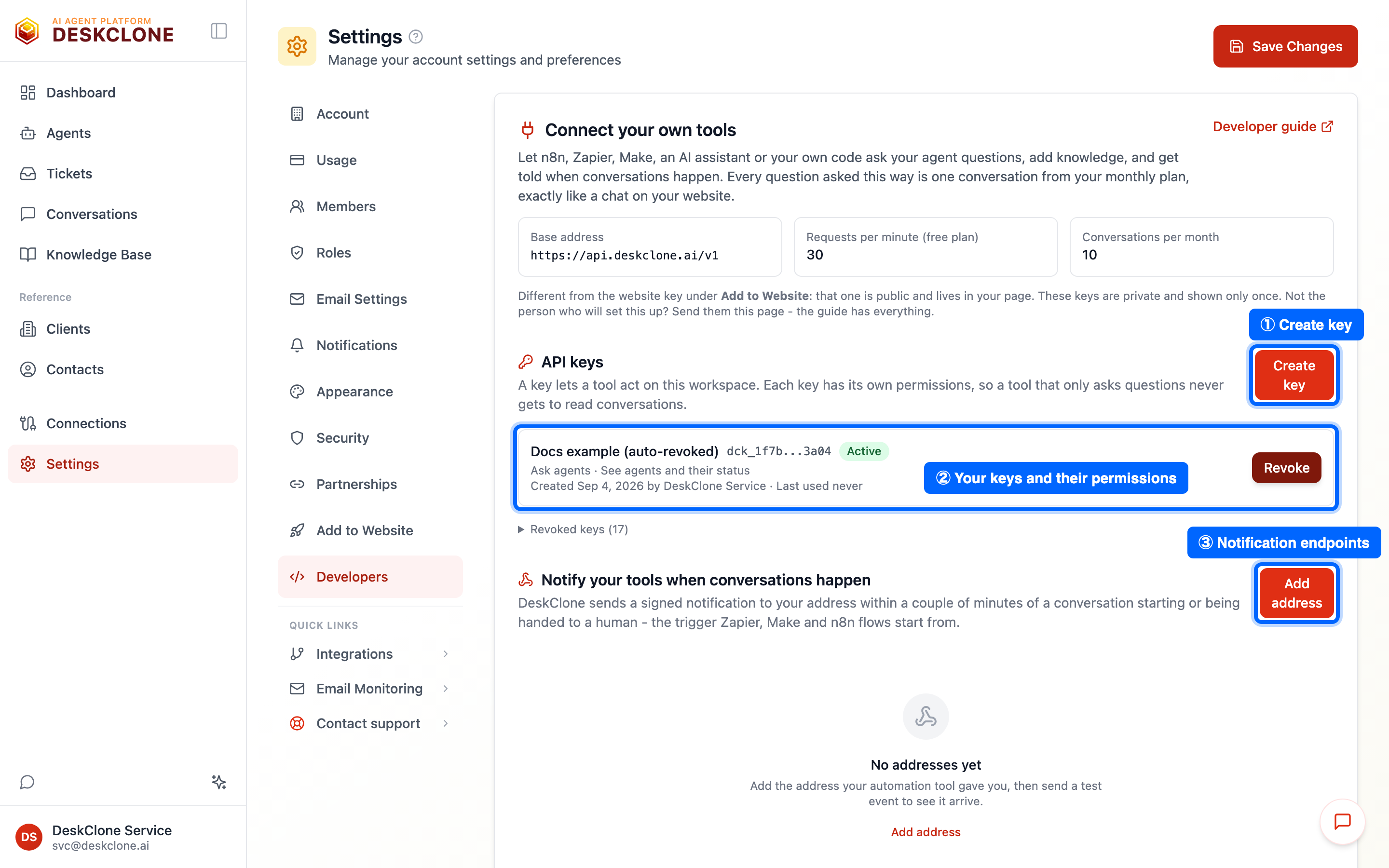
The Developers tab under Settings: the API keys list with permissions and last use, and the notification endpoints below it
curl https://api.deskclone.ai/v1/me \
  -H "Authorization: Bearer dck_your_key_here"
Create keys under Settings > Developers. Each key has its own permissions, chosen when you create it:
| Permission | Lets a key | Default |
|---|---|---|
| Ask agents | Send a question and get the answer (POST /agents/{id}/ask) | On |
| See agents and their status | List agents; see whether one is published and what it knows | On |
| Read conversations | List and read conversations, including what visitors wrote | Off |
| Add knowledge | Import a website or upload documents | Off |
| Manage notifications | Register, test, pause and remove webhook endpoints | Off |
A key you no longer need is revoked with one click; anything using it stops immediately. The list shows when and from which address each key was last used, which is the quickest way to notice a leaked one. Keys stop working while the person who created them is deactivated; create a new one for your tool in that case.
Rate limits
Two limits apply, and the response tells you which one you met.
| Plan | Requests per minute per key | Conversations per month |
|---|---|---|
| Free | 30 | 10 |
| Starter | 60 | 100 |
| Pro | 300 | 500 |
| Business | 600 | as your plan |
Conversation turns are also bounded by your workspace's chat limit, 30 turns per minute by default, shared with your website widget. So the per-key number is the limit for reads and polling; a Business key cannot ask 600 questions a minute. Every response carries X-RateLimit-Limit, X-RateLimit-Remaining and X-RateLimit-Reset; a refused request is a 429 with Retry-After.
Errors
Every error has the same shape and a stable code you can branch on:
{"error": {"code": "conversation_limit_reached", "message": "Support chat is at capacity for this billing period.", "current": 10, "limit": 10, "reset_date": "2026-10-01"}}| Status | Code | Meaning and what to do |
|---|---|---|
| 401 | invalid_api_key | Missing, wrong or revoked key. Create one under Settings > Developers. |
| 403 | scope_missing | The key lacks the permission the call needs; the message names it. |
| 403 | key_suspended | The key's creator was deactivated; create a new key. |
| 404 | agent_not_found, conversation_not_found | No such id in your workspace. |
| 409 | agent_not_published | Publish the agent from the dashboard first; the response links to it. |
| 409 | conversation_busy, conversation_closed, conversation_escalated | The conversation cannot take a new question right now; the message says why. |
| 413 | message_too_long | Keep a message under 8 KB; import documents as knowledge instead. |
| 422 | validation_error, url_not_crawlable | The request is malformed; errors lists the fields. |
| 429 | rate_limited, workspace_chat_limit, conversation_limit_reached, session_cost_ceiling_reached, tenant_daily_cost_cap | A limit was met; Retry-After says when to try again, and the message says which limit. |
| 502 / 503 / 504 | answer_unavailable, agent_busy, answer_timeout | The agent could not answer this time; ask again with the same conversation_id. |
Versioning and deprecation
The address carries the version: /v1. Additions (new optional fields, new response fields, new endpoints) never change it, so your code must ignore fields it does not know. Removals, renames or changes of meaning go to /v2. When a /v2 ships, /v1 stays available for at least 12 months, deprecated responses carry Deprecation, Sunset and Link headers, and nothing is ever turned off without a dated notice in the changelog at the bottom of this page. Keys are not versioned; a key works across versions. Webhook payloads carry "version": "1" and follow the same rule, with 90 days' notice before a change.
Endpoints
The full machine-readable description is at https://api.deskclone.ai/v1/openapi.json (and browsable at https://api.deskclone.ai/v1/docs).
Check a key
GET /v1/me needs no permission and returns the workspace, the key's permissions and the plan limits. Use it as the "test credentials" call in any tool.
Ask an agent
POST /v1/agents/{agent_id}/ask with message and, to continue an earlier conversation, its conversation_id. Optionally pass visitor (name, email, reference) so a handoff to a human has a way to reply.
curl -X POST https://api.deskclone.ai/v1/agents/AGENT_ID/ask \
  -H "Authorization: Bearer dck_your_key_here" \
  -H "Content-Type: application/json" \
-d '{"message": "Do you ship to Canada?", "visitor": {"email": "ann@example.com"}}'{"conversation_id": "5b2c...", "answer": "Yes - orders to Canada ship within 3 business days...", "escalated": false, "escalation": null, "sources": [{"type": "knowledge", "path": "policies/shipping.md"}], "messages": 2, "new_conversation": true}The agent answers from public knowledge only, with the same safety checks as your website chat, and can hand the conversation to a human exactly as it would for a visitor (escalated is then true and escalation carries the ticket reference and your support email). Answers take a few seconds; a question that takes longer than 25 seconds returns 504 answer_timeout with the conversation_id, and you can ask again to continue.
List agents and check readiness
GET /v1/agents lists agents with their ids. GET /v1/agents/{agent_id}/status says whether the agent is published, active and ready, how many pages of public knowledge it has, and, while an import runs, its progress. When something is missing, next_step says what to do and links to it.
Add knowledge
POST /v1/knowledge/imports with {"url": "https://www.example.com"} reads up to 25 pages of a website (max_pages, up to 50) as public knowledge. POST /v1/knowledge/imports/upload takes a document as multipart form data (file, plus an optional visibility of public or internal). Both return 202 with the import's id and state; poll GET /v1/knowledge/imports/{id} until it is done, needs_review (a big change waits for a human in the dashboard) or failed (the reason is in detail). Imports count against your monthly import allowance and run two at a time per workspace.
Read conversations
GET /v1/conversations lists conversations newest first, with agent_id, since, until, outcome (active, resolved, escalated, abandoned, ended), page and limit (up to 100). GET /v1/conversations/{id} adds the messages. Conversations carry what a visitor typed and any name or email they gave, so this needs the "Read conversations" permission. They never carry your platform costs or technical internals.
Notifications (webhooks)
Register an https address under Settings > Developers (or POST /v1/webhooks with url and events) and DeskClone posts a signed JSON message to it within a couple of minutes of:
conversation.created- a visitor or an API caller has said something to an agent.conversation.escalated- the agent handed a conversation to a human.
{"version": "1", "id": "msg_3f...", "type": "conversation.escalated", "created_at": "2026-09-03T10:12:00+00:00",
 "data": {"conversation": {"id": "5b2c...", "agent_id": "...", "started_at": "...", "source": "embedded", "escalated": true, "outcome": "escalated", "turns": 4, "visitor": {"email": "ann@example.com"}, "first_message": "I was charged twice"},
          "escalation": {"reason": "user_requested", "ticket_ref": "a1b2c3d4"}}}
Deliveries are retried for a day (after 1 minute, 5 minutes, 30 minutes, 2 hours, 8 hours and 24 hours), so your endpoint may see a message more than once; treat the webhook-id header as the deduplication key. An endpoint that fails for three days is paused automatically; the Developers tab says why and lets you resume it. Send test event posts a ping and shows the status code your endpoint returned.
Verify the signature
Every message carries webhook-id, webhook-timestamp and webhook-signature headers in the Standard Webhooks format, signed with the secret shown once when you registered the endpoint. Verify with the standard-webhooks library for your language, or by hand:
import base64, hashlib, hmac, time

def verify(secret: str, headers: dict, body: bytes) -> bool:
    msg_id, ts, sig = headers["webhook-id"], headers["webhook-timestamp"], headers["webhook-signature"]
    if abs(time.time() - int(ts)) > 300:
        return False
    key = base64.b64decode(secret.removeprefix("whsec_"))
    expected = base64.b64encode(hmac.new(key, f"{msg_id}.{ts}.".encode() + body, hashlib.sha256).digest()).decode()
return any(hmac.compare_digest(expected, s.split(",", 1)[1]) for s in sig.split() if s.startswith("v1,"))const crypto = require("crypto");
function verify(secret, headers, rawBody) {
const id = headers["webhook-id"], ts = headers["webhook-timestamp"], sig = headers["webhook-signature"];
if (Math.abs(Date.now() / 1000 - Number(ts)) > 300) return false;
const key = Buffer.from(secret.replace(/^whsec_/, ""), "base64");
const expected = crypto.createHmac("sha256", key).update(`${id}.${ts}.`).update(rawBody).digest("base64");
return sig.split(" ").some(s => s.startsWith("v1,") && crypto.timingSafeEqual(Buffer.from(expected), Buffer.from(s.slice(3))));
}Use the raw request body, not a re-serialised copy.
Ask your agent from an AI assistant (MCP)
DeskClone is also an MCP server at https://api.deskclone.ai/v1/mcp. Any MCP client that can send a header connects with your key and gets three tools: ask_agent, list_agents and get_agent_status. Each new conversation counts against your plan like a website chat.
claude mcp add --transport http deskclone https://api.deskclone.ai/v1/mcp \
--header "Authorization: Bearer dck_your_key_here"{"mcpServers": {"deskclone": {"url": "https://api.deskclone.ai/v1/mcp", "headers": {"Authorization": "Bearer dck_your_key_here"}}}}The second snippet is the mcp.json shape Cursor and VS Code use. The server is stateless, so there is nothing to keep alive between calls.
Automation tools
Any tool that can receive a webhook and make an HTTP request works with DeskClone, and there are hundreds of them: n8n, Zapier, Make, Pipedream, Power Automate, Workato, a cron job on your own server. The recipe is the same in all of them, and it has two halves.
Notifications in. Create the tool's webhook trigger (every tool has one, under a name like Webhook, Catch hook or Custom webhook), paste the address it gives you as an endpoint under Settings > Developers, and press Send test event to watch the ping arrive. From then on the tool receives every event you subscribed to, signed as described above.
Questions out. Use the tool's HTTP action to call POST /v1/agents/{id}/ask with your key in the Authorization header as Bearer dck_... and the question in the body. Keep the conversation_id from the reply and send it with the next question when it is a follow-up.
A native DeskClone node for n8n is prepared and will be linked here once it is published on npm.
Whatever the tool, start with GET /v1/me. If it returns your workspace name, the key and the address are right, and the rest is just picking endpoints.
Changelog
- v1, Sep 3, 2026 - first release: keys,
ask, agents and status, knowledge imports, conversations, webhooks (conversation.created,conversation.escalated), the MCP server.
Getting Help
Stuck? Email hello@deskclone.ai with the code from the error and, if you have it, the conversation_id; that is enough for us to see exactly what happened. For anything about the dashboard itself, the Troubleshooting page covers the common cases.
Was this page helpful?