Account and Billing
This page covers your organization settings, team management, plan details, and usage tracking.
Account Settings
Navigate to Settings in the sidebar to access your organization settings.
Here you can manage:
- Organization name - the name of your company or team, shown in the dashboard
- Account preferences - general configuration for your workspace
To edit your own name and avatar (rather than the organization's), open Profile from the account menu - click your avatar at the bottom of the sidebar.

The account settings page showing the organization name and preferences
Team Members
DeskClone lets you invite as many teammates as you need - seats are not gated on any plan - and roles control what each person can see and change.
See Team and Permissions for the full walkthrough of inviting members, assigning roles, and managing access.
Plan Tiers
Each paid plan is a monthly or annual subscription - annual billing costs less per month. A plan determines how many conversations your agent can handle per month, plus which features are available. Think of it as hiring your agent at different capacity levels.
Free - $0/month
- Your agent handles up to 10 conversations per month
- 1 agent
- 50 files per month via Smart Import
- Assisted autonomy mode
- Community support
The Free plan has no time limit. It gives you enough capacity to test your agent with real interactions and see how it performs with your content.
Starter - $19/month ($16/month billed annually)
- Your agent handles up to 100 conversations per month
- 1 agent
- 300 files per month via Smart Import
- DeskClone-branded widget and form
- Assisted autonomy mode
- Basic analytics
- Email support
- Rollover bank: up to 100 unused conversations carry over
Pro - $59/month ($49/month billed annually)
- Your agents handle up to 500 conversations per month
- Up to 3 agents
- 1,000 files per month via Smart Import
- White-label widget and form (your brand, no DeskClone branding)
- Full autonomy modes
- Full analytics dashboard (drill-throughs, weekly trends, topic breakdown, CSV exports)
- Approval workflows
- Priority support
- Rollover bank: up to 500 unused conversations carry over
Business - $199/month ($166/month billed annually)
- Your agents handle up to 2,000 conversations per month
- Up to 10 agents
- Unlimited Smart Import
- Custom widget and form styling
- Full autonomy modes
- Full analytics with API access
- Dedicated support
- Rollover bank: up to 2,000 unused conversations carry over
Need more than 10 agents or 2,000 conversations? Contact us about Enterprise plans with custom capacity and a dedicated account manager.
What Is Included on Every Plan
These features are available on all plans, including Free:
- Unlimited knowledge base files - add as much content as you need
- Unlimited team members - no per-seat charges
- Unlimited clients - organize your work by client without limits
- Email monitoring - automatic ticket creation from incoming email
- All import sources - Google Drive, Notion, email history, website crawling, and file upload
- Full ticket management - create, track, assign, and resolve tickets
What Counts as a Conversation
A conversation is one customer interaction thread. A visitor reaches out, your agent works through it - whether that takes 2 messages or 20, it is one conversation. Each conversation can include multiple back-and-forth messages, knowledge base lookups, and tool calls.
All of your agent's customer conversations count toward monthly capacity - website widget chats, freeform chats, and ticket conversations alike. Building and configuring your agent never does (see the build allowance below).
Exceptionally long conversations that exceed roughly 40-50 back-and-forth exchanges with knowledge base lookups may count as more than one conversation toward your monthly capacity. This is rare in typical support interactions.
Conversations are counted monthly and reset on your billing cycle date.
Test Conversations
The Test tab on your agent gives you 5 free test messages per agent each day, so you can always try changes safely. Past that daily allowance, test conversations count toward your monthly capacity like real ones - the test chat shows a small notice when that happens, so it is never a surprise. The free allowance resets at midnight UTC.
Rollover and Booster Packs
Rollover
Unused conversations from your monthly allocation automatically roll over to the next month. Your rollover bank can hold up to one month's worth of conversations (for example, up to 100 on Starter, up to 500 on Pro). Rolled-over conversations are used first.
Booster Packs
If your agents need extra capacity during a busy month, you can purchase booster packs without changing your plan:
- Small Boost - 50 conversations for $15
- Medium Boost - 100 conversations for $25
- Large Boost - 200 conversations for $45
Booster packs are available on all plans, including Free. Unused booster conversations merge into your rollover bank at the end of the month. Since the bank holds up to one month's worth of conversations, pack conversations beyond that capacity stay available for the current month only. There is no limit on how many packs you can buy.
Booster packs are great for handling seasonal spikes without committing to a higher tier. If you find yourself buying packs regularly, upgrading to the next tier will save you money.
Usage Tracking
To see your current usage:
- Navigate to Settings > Usage
- Your usage summary shows conversations handled - combined and broken down by source - plus rollover and booster balances and your other plan limits
- Booster packs can be added directly from this page whenever you need more capacity this month
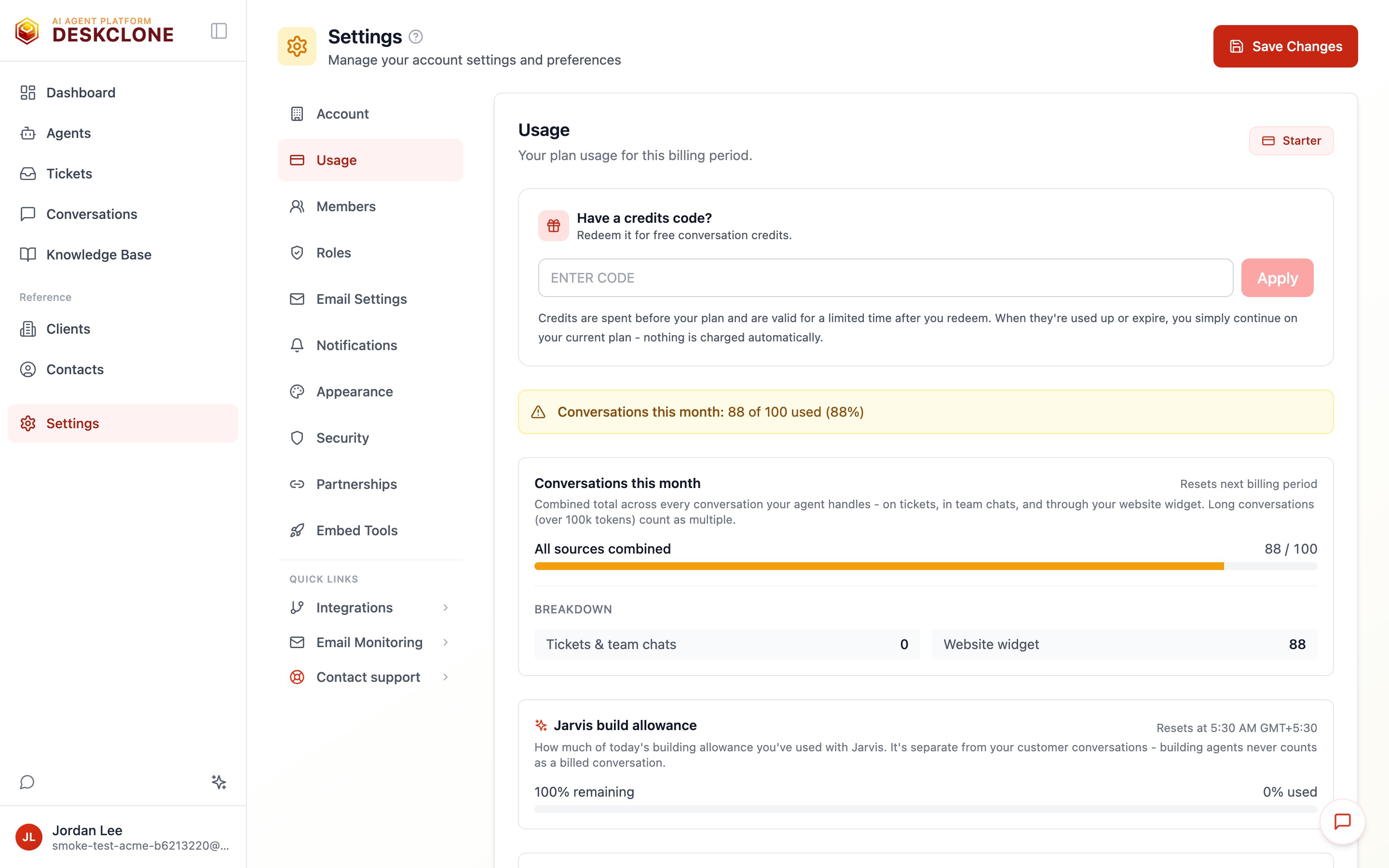
The Usage page showing the combined conversations meter with the per-source breakdown and other plan resources
What Happens as You Approach Your Conversation Limit
DeskClone uses soft caps, not hard cutoffs. As your agents use up their monthly conversations, you get a heads-up so nothing is a surprise:
- At 80% capacity - a gentle banner in your dashboard lets you know how many conversations remain
- At 95% capacity - a clearer nudge, with the booster-pack options surfaced so you can top up before you run out
- At 100% capacity - you will see options to grab a booster pack or upgrade when starting a new conversation, but your existing workflows continue. Tickets are still created from email, your knowledge base is still searchable, and existing conversations are still viewable.
The limit applies to new conversations only. Everything else in the platform continues to work normally.
If your agents are consistently hitting their capacity, it is a good sign - it means DeskClone is providing real value. Upgrading to the next tier gives your agents more capacity at a lower cost per conversation.
If a Payment Fails
If a payment does not go through - most often an expired card, or a bank declining a charge it does not recognise - here is exactly what happens:
- We email the account admin to let you know, with a link to update your payment method.
- Your agents keep working normally. Nothing changes for your customers, and your website chat stays live.
- You have a grace period of 7 days from the missed renewal to update your payment details. Your account page shows a "Payment failed" notice during this time instead of the usual renewal date.
- If the payment is still not updated after the grace period, your workspace moves to the free plan limits until it is sorted out. Nothing is deleted - your knowledge base, agents, tickets and history all stay exactly as they are, and your full capacity returns as soon as payment succeeds.
To fix it, go to Settings > Usage and update your payment method. If something looks wrong, reply to the email we sent - a real person reads it.
Your Build Allowance
Building and configuring agents through chat never uses up your conversations. Instead, every plan includes a separate Jarvis build allowance - capacity for building, refreshed automatically through the day. Higher plans include a larger allowance.
The Jarvis build allowance card on Settings > Usage shows how much of the current window you have used and when it refreshes:
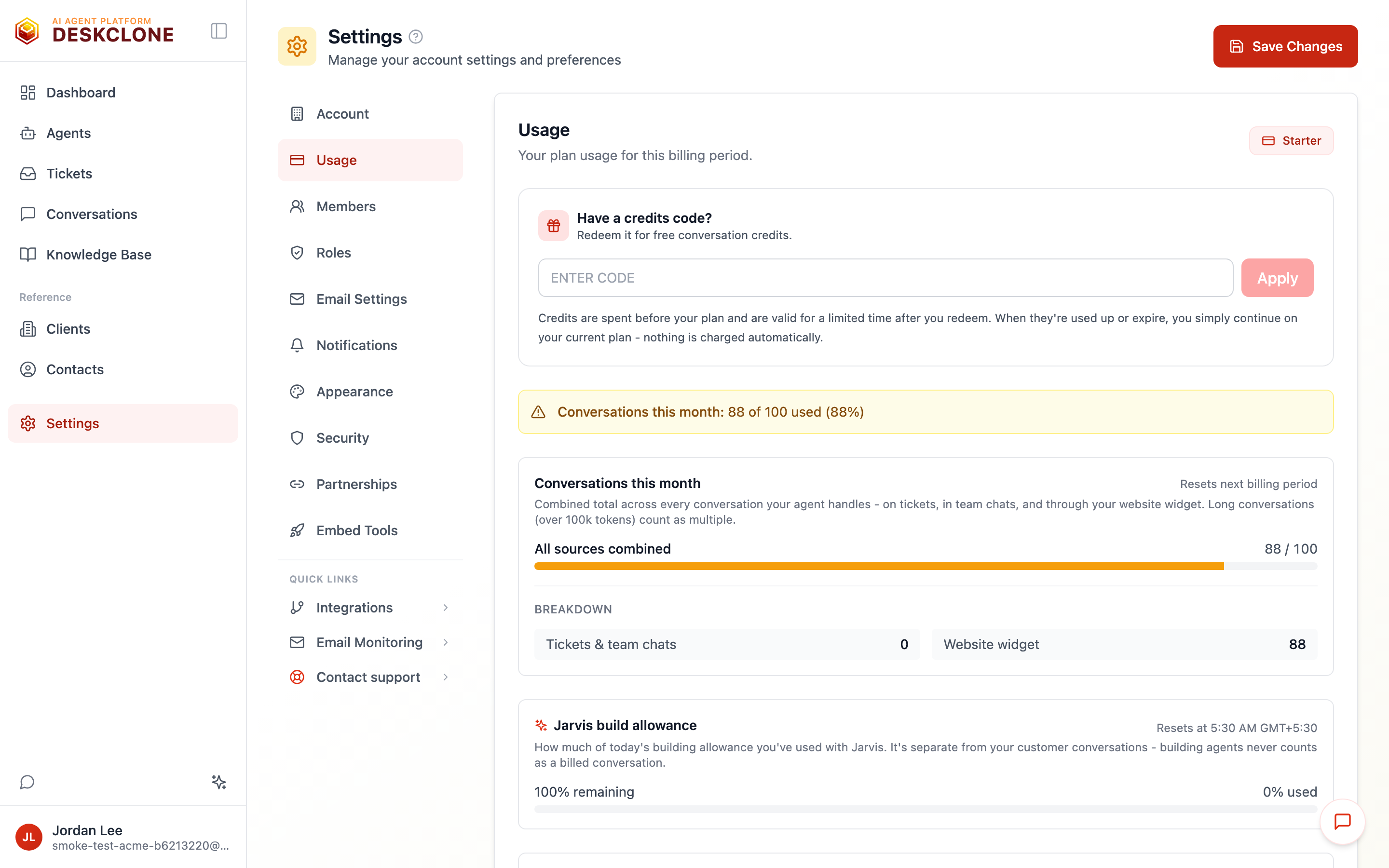
The Usage page showing the Jarvis build allowance card with percent used and refresh time, above the combined conversations meter
- Around 85% used - a small amber heads-up appears in the build chat, with Check usage and Upgrade plan one tap away
- At 100% - building pauses until the allowance refreshes. Nothing is lost - your chat and agents stay exactly as they are
Mid-build and need to keep going? Contact support from the notice and we will lift the allowance for you right away. Upgrading your plan raises it permanently.
Your Subscription, Payments, and Receipts
A few practical answers about the money side, in one place:
- Renewal - your subscription renews automatically on your billing date, monthly or annually depending on what you chose. Your conversation allocation resets at the same time.
- Payment method and receipts - payments are processed by Dodo Payments, our merchant of record. Your payment method is stored securely with them, never on DeskClone's servers, and Dodo emails you a receipt for every charge. Need an invoice for your records? The emailed receipt serves as one; write to hello@deskclone.ai if you need extra details on it.
- Upgrades and downgrades - upgrades take effect immediately; downgrades take effect at your next billing cycle, so you keep what you paid for until then.
- Cancel your subscription - you can cancel at any time; cancellation takes effect at the end of your current billing period, and you drop to the Free plan rather than losing access. Nothing is deleted.
- Refunds - we do not offer refunds for partial billing periods, and a failed payment is never charged. If something looks wrong with a charge, contact hello@deskclone.ai and we'll work to make it right.
- Closing your account - to delete your account entirely, cancel your subscription and contact us; your data is deleted within 30 days.
Early Access
DeskClone is currently in early access. All features are available, and the platform is fully functional. Payment processing is being set up - during early access, upgrade and booster actions open a short request form rather than a checkout, and current users have free access.
When payments go live, you will be notified in advance and can choose your plan. Early access users will receive special consideration.
Once payments are live, checkout happens on our payment provider's secure page, and you are brought back to Settings afterwards with a clear notice of what happened: a confirmation that your new capacity is active, or - if the payment failed - an honest notice that nothing was charged, with a retry path and a way to reach us at hello@deskclone.ai.
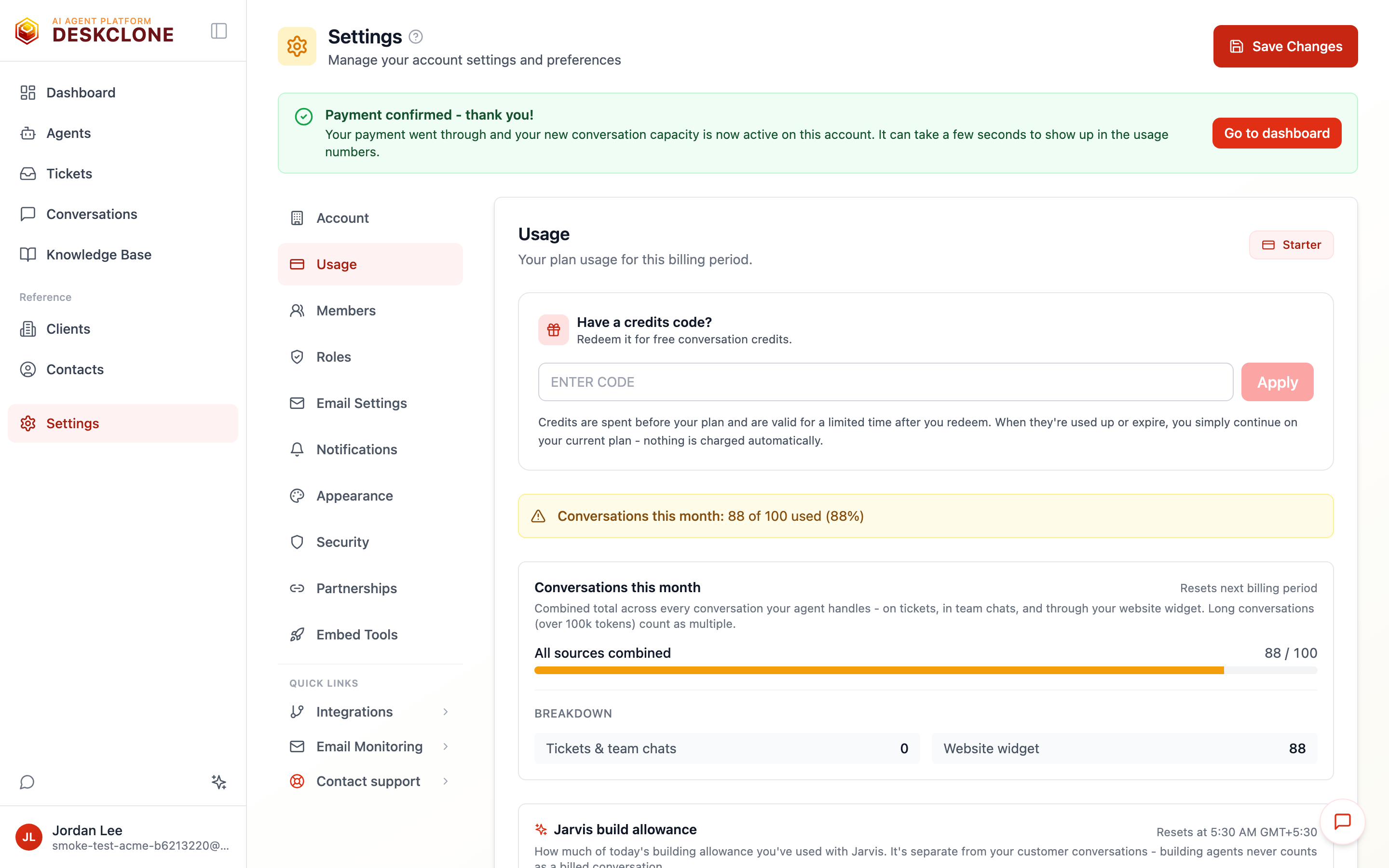
The Settings page after returning from checkout, showing the payment confirmed banner with a Go to dashboard button
What's Next
If you run into any issues, check the Troubleshooting guide for solutions to common problems.
Was this page helpful?